Verifying your email on IMVU shouldn’t feel like solving a Rubik’s cube blindfolded! First, if you’re on the website, log in, head to Settings, and just click “Verify Email.” On your mobile app? Tap that little settings icon at the top right. If you’ve chosen an active email address and still don’t see the verification message, check those pesky spam or junk folders. And hey, if you’re using Hotmail or Outlook, they can be real divas, consider switching providers! Want to know your verification status? Check the Email Verification Page after logging in; it will let you know if you’re “Verified” or need another nudge. If trouble strikes with 2-Factor Authentication codes not showing up, breathe, it happens! Make sure your email is verified and poke around those junk folders before resending for help from IMVU support if needed. Happy verifying!
Table of Contents
- How to Verify Your Email Address on IMVU
- Checking Email Verification Status
- Troubleshooting Common Email Issues
- Common Issues and Solutions
- Frequently Asked Questions
1. How to Verify Your Email Address on IMVU
 Credits: support.imvu.com
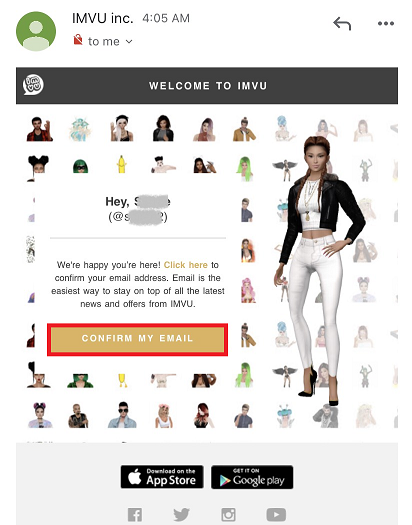
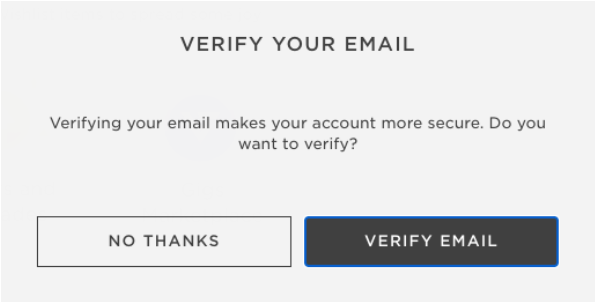
So, you want to verify your email on IMVU? Great choice! First, log into your account and head over to Settings. If your email is unverified, a friendly little prompt will pop up, asking if you want to verify it. Just click “Verify Email” and voilà, you’re on your way to email glory! For our mobile users, it’s just as easy. Open the IMVU Mobile app, log in, tap the settings icon at the top right, and click on “Change Email” to enter your preferred email. Don’t forget, you’ll need to confirm it by tapping “Confirm My Email” in the email they send you. Now, if you’re using the Classic website, simply log in, navigate to Account Settings, and find the magical “Verify Email” option under Account Tools. Once you verify, you’ll see a shiny “Verified” badge under Email Settings, like receiving a gold star in class! Just a quick tip: always check your Spam or Junk folders because IMVU emails can sometimes play hide and seek. If you’re using Hotmail or Outlook, you might want to consider switching to a different provider, since they can be a bit of a party pooper when it comes to receiving IMVU’s emails. Remember, keeping your email up-to-date is crucial for not missing out on all the fun updates and promotions from IMVU!
2. Checking Email Verification Status
 Credits: support.imvu.com
To check if your email is verified, just log into IMVU and strut your way over to the Email Verification Page. Here, your status will either say “Verified” or “Not Verified” (yep, it’s not rocket science). If it’s a “Not Verified,” don’t panic! Just click that shiny button to send a new verification email and let the magic unfold. You can also sneak a peek at your status in your Account Settings under Email Settings, where all the secrets are kept. If you’re scratching your head over your status, recheck your email for the verification email after hitting send. Keep your email open and ready to catch that verification email like a ninja on a mission. Remember, sometimes emails take a tad longer to arrive, so practice your patience (it’s a virtue, after all). If all else fails, a good old log out and back in might do the trick to refresh the system. And if you see “Verified,” feel free to do a little happy dance, because you’ve earned it! Just keep your email associated with IMVU clean and updated, so you always receive those important messages.
3. Troubleshooting Common Email Issues
 Credits: support.imvu.com
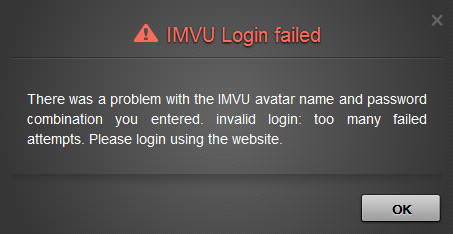
If you’re sitting there twiddling your thumbs because you haven’t received your 2FA code, let’s get to the bottom of this mystery. First things first, check if your email is verified. It’s like checking if your keys are in your pocket before you leave the house. If it’s not verified, you won’t get that precious code. Next, give your spam or junk folders a quick peek. Sometimes, important emails end up there, lost like socks in a dryer. If you still can’t find the code, don’t be shy, click that resend button! Everyone deserves a second chance, right?
Now, if you’re still facing a dark cloud of email silence, reach out to IMVU support. Think of them as your email superheroes, ready to swoop in and save the day. And don’t forget to check your internet connection; a little buffering might be the reason you’re not receiving those emails. Also, ensure your email provider isn’t playing gatekeeper. They can get a bit possessive over their inboxes.
If you’ve recently changed your email, make sure you’re checking the right one. It’s like getting a new phone, make sure you remember your new number! And hey, double-check the email address you entered when signing up. Typos can be sneaky little gremlins. If all else fails, consider switching email providers. Sometimes, a fresh start is just what you need. Remember, troubleshooting is like leveling up in a video game; it may get tougher, but the rewards are totally worth it!
| Issue | Solution |
|---|---|
| Not Receiving 2FA Code | Ensure your email is verified in your IMVU account settings. |
| Email in Spam Folder | Check spam or junk folders for the code. |
| Code Missing After Resend | Use the feature to resend the 2FA code if available. |
| Persistent Issues | Contact IMVU support for help. |
4. Common Issues and Solutions
If your verification email is playing hide and seek, first things first, check if your email provider is being a bit of a gatekeeper. Sometimes they block emails from IMVU like a bouncer at a club. Also, take a look at any filters or rules you might have set up; you don’t want IMVU emails ending up in the Bermuda Triangle of your inbox!
If you’re switching to a new email address, remember to follow the same verification steps to keep things legit. Sometimes a little nudge is all it takes, so don’t hesitate to request a new verification email from the settings page if the original is MIA. If you get a verification email that doesn’t work, try resending it; it might just need a little coaxing to do its job.
Stuck in an endless loop of verification issues? Don’t fret, reaching out to support might just be your saving grace. And hey, make sure your inbox isn’t full, because emails love to bounce back like a bouncy ball when there’s no room at the inn.
Consider clearing your email’s cache; it’s like giving your inbox a fresh start! If all else fails and the same problem keeps popping up, check out the IMVU forums where fellow users share their wisdom. Taking the time to resolve these pesky issues can save you from future headaches, and who doesn’t want that?
- If your verification email is MIA, check if your email provider is blocking IMVU emails, they can be quite the gatekeepers.
- Look for any filters or rules you might have set that could be sending IMVU emails to another folder, like the Bermuda Triangle of emails.
- If you’re changing your email address, follow the same verification steps to ensure the new address is legit.
- Request a new verification email from the settings page, sometimes the first one just needs a little nudge to show up.
- If you receive a verification email but it doesn’t work, try resending it again, sometimes it just needs a little coaxing.
- If you find yourself stuck in an endless loop of verification issues, contacting support may be your saving grace.
- Make sure your inbox isn’t full, because sometimes emails just like to bounce back like a bouncy ball.
- Consider clearing your email’s cache, it’s like giving your inbox a fresh start!
- If you keep getting the same problem, check the IMVU forums, where fellow users share their wisdom.
- Taking time to resolve these issues can save you from future headaches, and who doesn’t want that?
Frequently Asked Questions
Why am I not receiving the IMVU verification email?
Well, it could be hiding in your spam folder, having a little party with all the other unwanted emails. Check there first, or it might just be that it took a coffee break, so be patient!
What should I do if the email link has expired?
If that link has gone stale, just request a new one. Kind of like grabbing a fresh bag of chips instead of munching on the old, crummy ones!
How can I change the email address linked to my IMVU account?
Changing your email is easy-peasy! Just head to your account settings and do a little digital jazz hands to update your email. It’s like switching out your old shoes for a shiny new pair!
Why do I keep getting an error when trying to verify my email?
Ah, the classic verification error! It could be a typo in your email or a glitch in the matrix. Double-check your entry and try again, and if that doesn’t work, maybe have a chat with tech support!
Can I verify my account without an email?
Unfortunately, no email means no party, my friend! The verification dance requires that email invitation. So, grab your email, and let’s get that verification going!
TL;DR Need to verify your email on IMVU? No problem! Just dive into your settings and hit “Verify Email”. If you don’t see the email, check your spam folder or try another email provider, because sometimes Hotmail and friends can be big party poopers. Got a verification question? Check your status through the Verification Page, and if it’s not verified, just resend that email like a boss. If you hit any bumps, like not getting your 2FA code, don’t panic! Just check your folders, resend, and if all else fails, IMVU support is just a click away. Happy IMVU-ing!



